
3. Bake your mesh
Optionally, when you are happy with your tree design, you can bake the meshes to save the runtime performance of rendering them from code each time.
1 min read
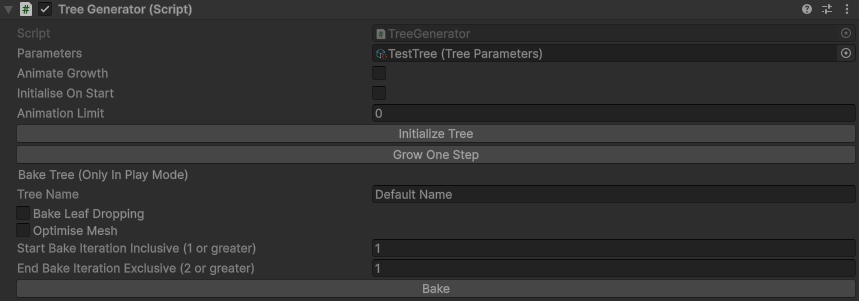
Bake leaf dropping will tell the baker you want to save all the different options for the leaves dropping based on the time of year (the colour is still controlled by the leaf colour controller)
The optimise mesh option uses the built in unity mesh utility optimise mesh on the meshes before saving them
Start iteration tells the baker what age to start the tree
End iteration tells the baker when to stop growing the tree
When you hit bake select an empty folder to store the baked meshes. It creates 3 sub folders, one for the tree meshes, one for the leaf meshes, and one for prefabs with the tree combined.
If the leaf parameters has seasonal colours it will automatically add a leaf colour controller to control these on the new mesh
P.S. If you do not want random generations to be baked, set the seed property in the tree properties
Configure the baker settings
The Mesh Bake Controller
Finally, if you add all the output prefabs to a parent object, and add a mesh bake controller, then add all the prefabs to its treeGameObjects you can automatically control the growth and season using the iteration and time of year variables

Time Passing Animator
There is another component, time passing animator, which you can add one, two, or all of the tree parameters, leaf parameters, and mesh bake controller to it will automatically control the iteration and time of year, based on the time passed and its animation multiplier

